
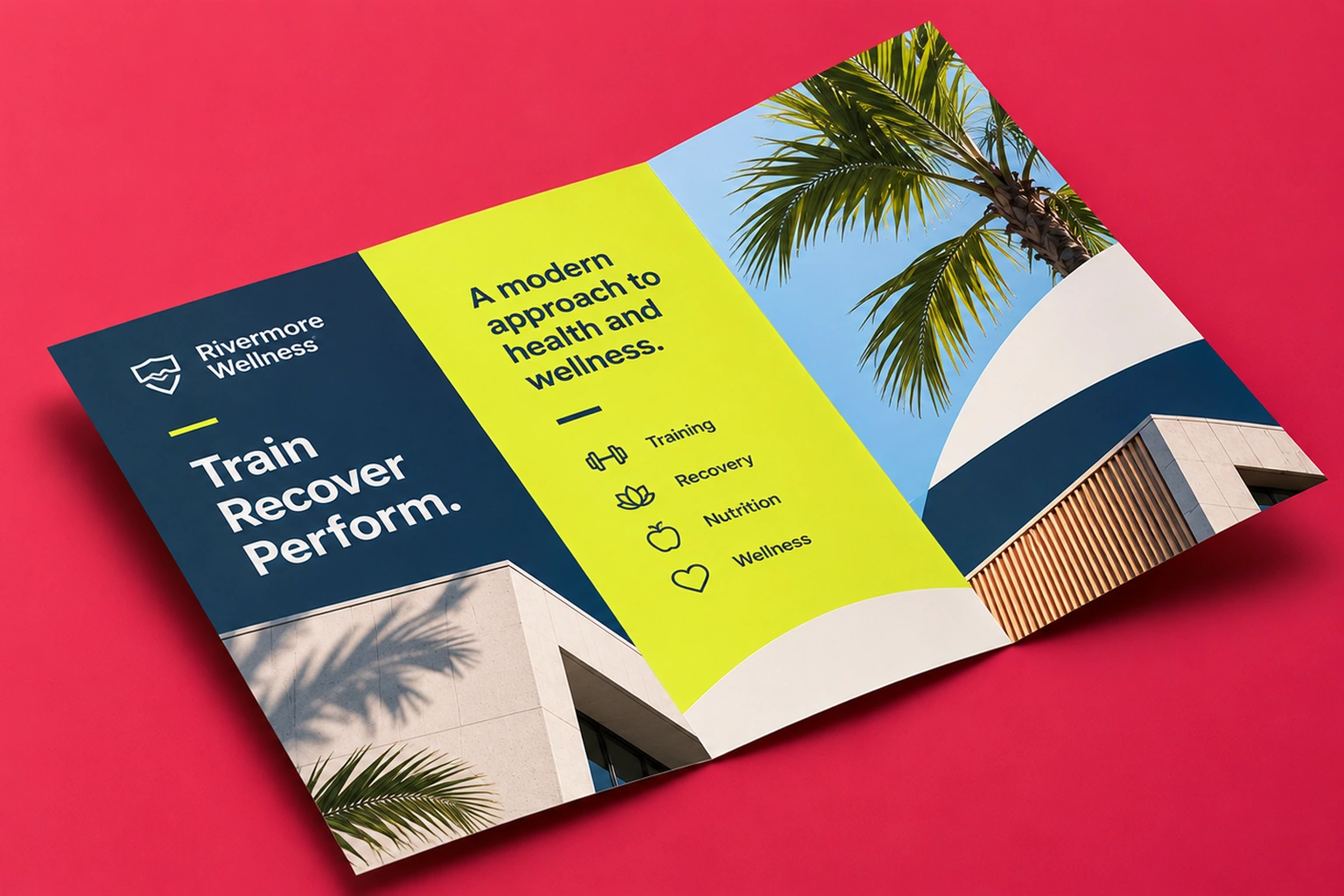
Ask five designers for the "standard brochure size" and you'll probably get five answers. That's because a brochure isn't one size. It's a flat sheet size combined with a fold style, and the two together decide how your content is revealed.
A single sheet of letter paper can become a classic trifold, a Z-fold, or a gatefold, and each one tells a different story when it's opened.
This guide covers standard brochure sizes and the most common folds, with both flat and folded dimensions, so you can choose the right format before you start designing. Bookmark it and keep it handy.
Brochure size vs fold: what's the difference?
Two measurements matter for every brochure:
- Flat size (also called the open or unfolded size) is the size of the printed sheet before it's folded. This is the size you build your file at.
- Folded size (also called the finished or closed size) is what people hold in their hands.
When a printer or template says "8.5" x 11" trifold," the flat size is 8.5" x 11" and the folded size is smaller, roughly 3.67" x 8.5". Mixing these up is one of the most common setup mistakes, so always check which size a spec refers to.
A panel is one section of the brochure between folds. More folds create more sections for organizing content, not more total printable area. A physical panel has two printable faces.
Standard brochure sizes available at Quixprint
Our nine flat sizes range from 6" × 9" to 12" × 18", plus an extended 11" × 25.5" six-page format. Letter (8.5" × 11"), legal (8.5" × 14") and tabloid (11" × 17") are familiar starting points.
Brochure size and fold matrix
The following table lists the folding choices in our online brochure configurator. Paper and other production specifications should be confirmed when requesting a quote.
| Flat size | Available folding options |
|---|---|
| 6" x 9" | Folding |
| 7" x 14" | Folding |
| 8.5" x 11" | Folding |
| 8.5" x 14" | Folding |
| 9" x 12" | Folding |
| 9" x 16" | Folding |
| 11" x 17" | Folding |
| 11" x 25.5" (6 Page Brochure) | Folding |
| 12" x 18" | Folding |
Common finished sizes
| Fold | Flat size | Approximate finished size | Printable faces |
|---|---|---|---|
| Half fold | 8.5" × 11" | 5.5" × 8.5" | 4 |
| Tri-fold / Z-fold | 8.5" × 11" | 3.67" × 8.5" | 6 |
| Tri-fold / Z-fold | 8.5" × 14" | 4.67" × 8.5" | 6 |
| Open gate fold | 8.5" × 14" | 7" × 8.5" | 6 |
| Closed gate / accordion / double parallel | 8.5" × 14" | 3.5" × 8.5" | 8 |
| Half fold | 11" × 17" | 8.5" × 11" | 4 |
| Tri-fold | 11" × 25.5" | 8.5" × 11" | 6 |
Calculated dimensions are nominal, not production template measurements. Confirm exact fold direction and panel widths before designing.
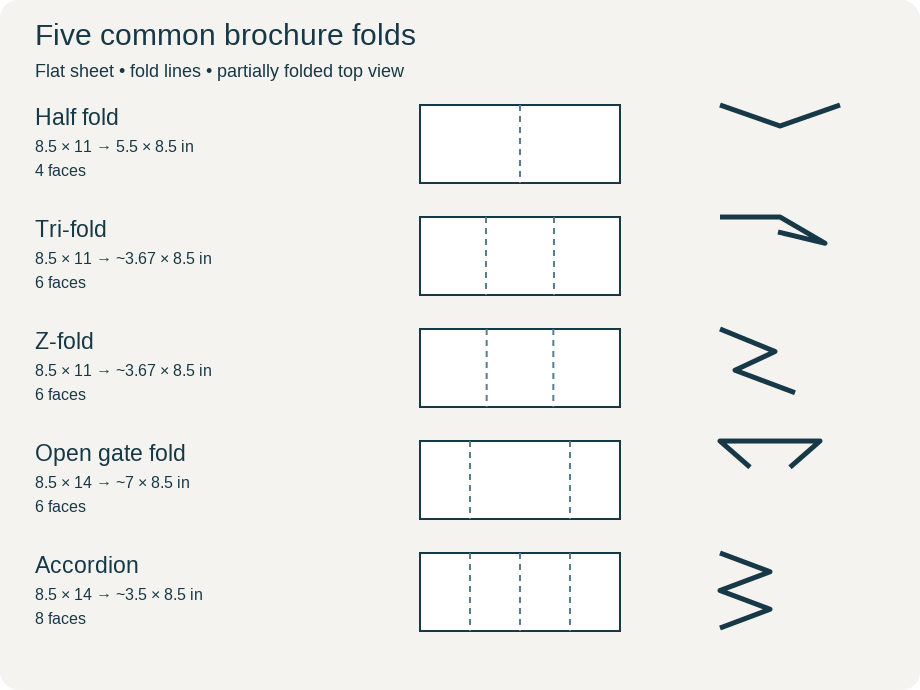
The five most popular brochure folds
1. Half-fold (bi-fold)
One fold, down the middle. You get four printable faces: front cover, two inside panels that form a spread, and back cover.
- Standard sizes: 8.5" x 11" flat (5.5" x 8.5" folded), or 11" x 17" flat (8.5" x 11" folded)
- Why choose it: It's simple, clean, and gives you a large spread on the inside for images or a big message.
- Best for: Menus, event programs, product sheets, brand introductions, and portfolios.
If you've got a lot of visuals and not much copy, the half-fold is hard to beat.
2. Trifold (letter fold)
Two folds make three panels per side, six printable faces in total. One panel folds inward and the other two close over it, like a letter going into an envelope.
- Standard size: 8.5" x 11" flat, about 3.67" x 8.5" folded
- Why choose it: It's the most recognized and versatile brochure format, and it fits standard brochure racks and envelopes.
- Best for: Services overviews, real estate listings, healthcare and financial information, school and nonprofit materials.
The trifold is the safe, reliable default. It organizes information naturally: a cover hook, a few key points, and a call to action on the back.
3. Z-fold
Also six printable faces on letter paper, but folded in an accordion zigzag so the sheet opens out in one continuous strip instead of tucking one panel inside another.
- Standard size: 8.5" x 11" flat, about 3.67" x 8.5" folded
- Why choose it: All panels are visible when opened, and you can design one long image or a sequence across the full spread.
- Best for: Step-by-step instructions, timelines, process explainers, and side-by-side comparisons.
The folded size matches the trifold, so the choice comes down to how you want the content to unfold.
4. Gatefold
Two outer panels fold in from the sides like doors and meet at the center, opening to reveal a wide inside spread.
- Standard size: 8.5" x 14" flat, approximately 7" x 8.5" folded (open gate fold)
- Why choose it: The "opening the doors" moment is memorable. It's perfect for a dramatic reveal.
- Best for: Product launches, premium brand pieces, real estate, and event invitations.
Think of the gatefold as the high-impact option. Use the center spread for your biggest image or message.
5. Accordion fold
Three or more folds in alternating directions, creating a zigzag that stacks neatly. Quixprint offers a four-panel accordion fold (eight printable faces).
- Standard sizes: 8.5" x 14", 9" x 12", 9" x 16", 11" x 17", and 12" x 18"
- Why choose it: Lots of room, a compact folded size, and a satisfying way to move through the content.
- Best for: Maps, itineraries, tourism and hospitality pieces, trade show handouts, and detailed guides.
Other brochure folds worth knowing
Beyond the main five, these folds are useful for specific projects:
- Roll fold (barrel fold): Panels fold inward in a spiral, like rolling a scroll. It creates a suspenseful reveal and is available in four-panel configurations on selected larger sheets.
- Double parallel fold: Folded in half, then in half again in the same direction. It gives you four panels per side and a compact result.
- Closed gate fold: A gatefold with a center that folds in half again. It's a premium, multi-reveal option.
- Half then half fold (cross fold): Folded in half, then in half again perpendicular to the first fold, forming a quarter-sheet. It's often used for maps, greeting cards, and large-format pieces.
We also offer double parallel reverse folds and half fold then trifold on selected sizes. See the matrix above and contact us for exact templates.
Why panels aren't all the same width
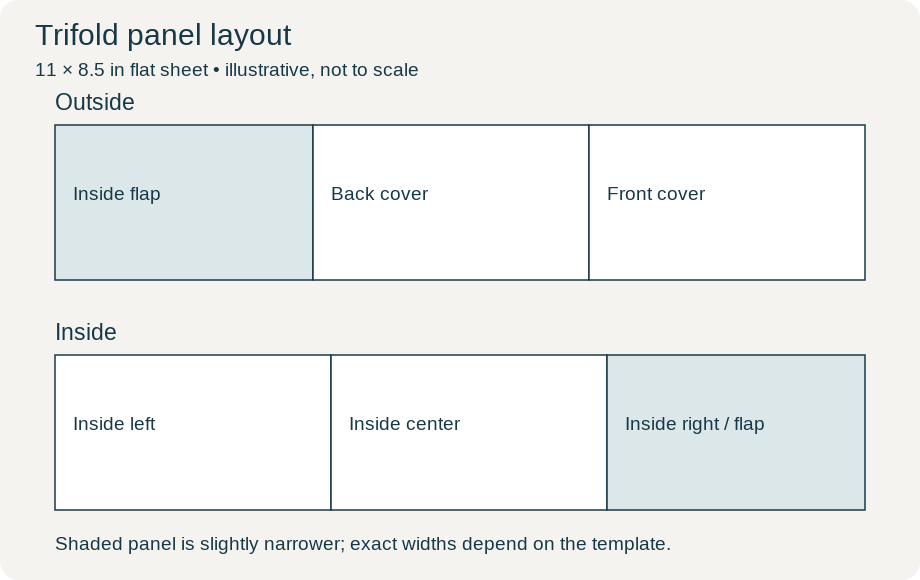
A "3.67" panel" sounds exact, but real trifolds aren't perfectly even. On a letter-sized trifold, the panel that folds inward is made slightly narrower than the other two, by an amount determined by the production template. Without that, the folded panel would buckle against the others and the edges wouldn't close cleanly.
That's why you should always use the template for your specific product rather than dividing the sheet evenly yourself. A template shows exact fold lines, panel widths, and safe zones.
Brochure vs flyer: which one do you need?
A flyer is a single flat sheet. A brochure is a sheet that's folded into panels.
- Choose a flyer for quick, single-message pieces: an event announcement, a sale, a promotion, or anything that gets read in seconds.
- Choose a brochure when you need to tell a story: multiple services, a product line, a process, or something customers will read and keep.
Both can share the same flat sheet size. A letter-size flyer and a letter-size trifold start out the same. The fold is what turns one into the other.
How to choose the right brochure size and fold
Work through these questions in order:
- How much content do you have? A little points to a half-fold. A lot points to a trifold, Z-fold, or accordion.
- How will you tell the story? Do you want a steady, panel-by-panel flow (trifold, accordion) or a big reveal (gatefold, roll fold)?
- How will it be distributed? Pocket-sized handouts and mailers need a compact folded size. Event tables and display racks have more room.
- Does it need to fit a rack or envelope? Standard trifolds (about 3.67" x 8.5" folded) often fit standard brochure racks and #10 envelopes; verify usable dimensions and clearance. Check any rack you're using.
- What's your budget? Larger sheets, more folds, and heavier paper all add cost. A standard letter-size trifold is often a practical starting point for pricing.
Quick recommendations:
- Most businesses: 8.5" x 11" trifold
- Image-led brands: Half-fold or gatefold
- Step-by-step content: Z-fold
- Maps and guides: Accordion
Design tips for folded brochures
- Build in the right size. Set up your file at the flat size, with bleed, and use the fold template.
- Keep content away from folds. Text running across a fold line gets distorted or hidden. Leave at least 0.125" to 0.25" clear on each side of every fold.
- Plan the reading order. On a trifold, the front cover and the panel that's seen first when opened carry the most weight. Place your key message and call to action deliberately.
- Check both sides. The outside and inside layouts must line up with the folds. It's easy to flip a panel by accident, so print a test and fold it by hand.
- Mind your paper. Heavier stocks look and feel better, but thick paper can crack at the fold unless it's scored. If you're using a heavy cover stock, ask about scoring.
- Mind the cover. Your front panel needs to work on its own, because it's what people see first.
Don't forget the fundamentals: typically 0.125" bleed, safe margins, 300 DPI images, CMYK color, and a clean PDF. Our guide on how to prepare files for printing covers the whole checklist.
What this means for your business
Your brochure's format is part of your message.
- Match the fold to the content. A trifold keeps things organized. A gatefold makes a statement. Choose the one that supports your story.
- Start with the standard. If you're unsure, an 8.5" x 11" trifold is a safe, cost-effective starting point.
- Use the template. The exact panel widths and fold lines are already worked out for you.
- Test with a mockup. A folded piece of paper at the right size will tell you more than a screen can.
Ready to print your brochure?
The best brochure size depends on what you need it to do. Start with your content, choose the fold that tells your story, and use a template so everything lines up.
At Quixprint, we print brochures in a range of sizes and folds, plus flyers when a single sheet will do. Tell us what you're making and we'll help you choose.
Not sure which fold fits your project?
Send us your content, quantity, and how you plan to use it, and we'll recommend a size and fold.
Get a brochure quote